
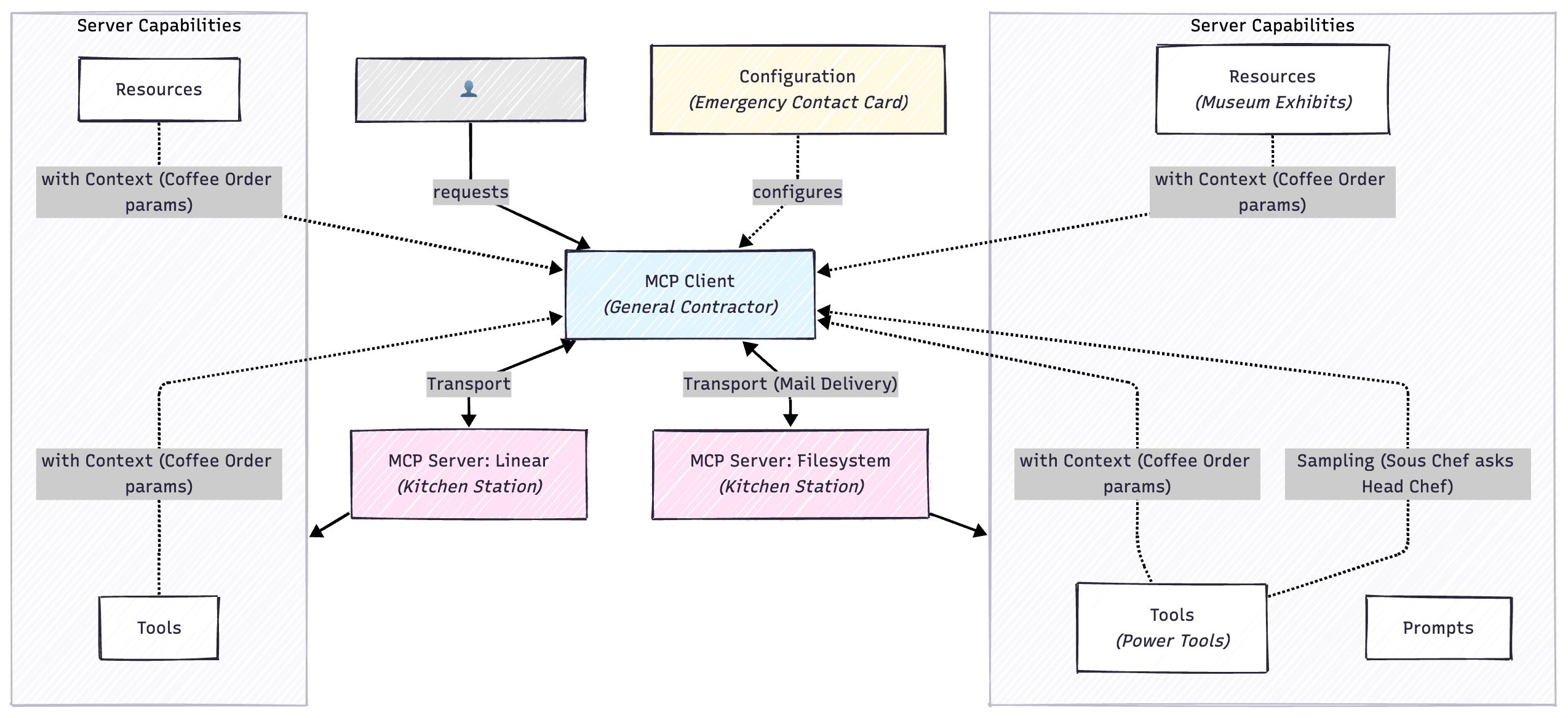
When I first started learning about Model Context Protocol, I kept finding that there was no “intermediate” level. Every explanation assumed either I knew nothing, and that I should just like to know “What does MCP stand for?” or that I was an expert and already knew what everything meant. I’d read “the MCP server exposes tools that the client can invoke” and think… right, but what is a server in this context? Is it like a web server? And what makes something a “tool” versus a “resource”?
I found myself toggling between documentation, blog posts, and example code, trying to piece together a mental model that made sense. Eventually I realised I needed to write down some explanations to help get everything to click.
If you read my previous post about AI building terms and metaphors, you’ll know I’m a big believer in using multiple explanations to understand new concepts. Sometimes the technical metaphor lands, sometimes it’s the completely unrelated one that makes everything suddenly make sense.
1. MCP SERVER
TL;DR A programme that exposes tools, resources, or prompts that Claude (or other LLM clients) can use. The “backend” in the MCP architecture.
What’s Important
- Can be written in any language (Python, TypeScript most common)
- Runs locally or remotely
- Can expose multiple capabilities (tools + resources + prompts)
- Discovered and connected to by MCP clients
- Each server has a specific domain (filesystem, calendar, Linear, etc.)
Unrelated Metaphor – Kitchen Stations
You’re running a restaurant kitchen. Claude is the head chef who takes orders and coordinates everything. Each MCP server is a specialised station: the grill station (can cook meat), the salad station (can prep vegetables), the dessert station (can make sweets). When an order comes in, the head chef doesn’t cook everything. They delegate tasks to each station. “Grill station, I need a steak medium-rare!” The head chef knows what each station can do and coordinates them, but each station has its own tools and expertise.
Developer Metaphor
It’s like a microservice with a standardised API contract. Instead of building custom REST endpoints, you implement the MCP protocol (JSON-RPC 2.0 over stdio/HTTP). Your server registers “handlers” for different functions. Same concept as Express routes or RPC methods. The MCP client discovers your server’s capabilities at runtime (like OpenAPI/Swagger but for AI tools), then invokes your functions with typed parameters. Each server is a bounded context in DDD terms. Filesystem handles files, Linear handles issues, etc.
2. MCP CLIENT
TLDR;
The application that connects to MCP servers and uses their capabilities. Claude.ai, Claude Desktop, and IDEs can be MCP clients.
What’s Important
- Manages connections to multiple servers
- Handles authentication and permissions
- Presents available tools to the LLM
- Routes requests between LLM and servers
- One client can connect to many servers
Metaphor – General Contractor
You’re renovating your house. The MCP client is your general contractor. You tell the contractor “I want a new kitchen with modern appliances.” The contractor maintains relationships with electricians (one server), plumbers (another server), cabinet makers (another server). When you make a request, the contractor figures out which specialists to call, coordinates their work, handles payments (authentication), and reports back to you. You don’t directly manage each specialist. The contractor does that.
Developer Metaphor
It’s like an API gateway combined with an orchestration layer. The client maintains a registry of connected services (servers), handles service discovery, manages authentication/authorisation for each service, and routes requests. When the LLM needs to call a function, the client: (1) determines which server handles it, (2) validates parameters against JSON Schema, (3) sends the request over the appropriate transport, (4) handles errors/retries, (5) returns results to LLM. It’s the conductor for a distributed system where the LLM is the orchestrator and servers are workers.
3. TOOL (or FUNCTION)
TLDR;
An action the MCP server can perform. Functions Claude can call to do things in the external world.
What’s Important
- Defined with JSON Schema (parameters, types, descriptions)
- Can modify external state (create files, send emails, etc.)
- Returns results back to Claude
- Can fail and return errors
- Each tool has a clear purpose and parameters
Unrelated Metaphor – Power Tools
Imagine a carpenter’s workshop. Each MCP server is a workbench with specific power tools. The woodworking bench has: table saw (tool for cutting straight lines), router (tool for decorative edges), sander (tool for smoothing). When you need something built, the carpenter doesn’t just “work on wood”. They choose specific tools for specific tasks. “I need to cut this board” leads to using the table saw tool with parameters: length=24 inches, angle=45 degrees. Each tool does one thing well, takes specific inputs, and produces specific outputs.
Developer Metaphor
It’s exactly like function definitions with strict typing. Each tool is a function with a JSON Schema signature:
typescript
interface CreateFileTool {
  name: "create_file";
  parameters: {
    path: string;
    content: string;
  };
  returns: { success: boolean; error?: string };
}
The client validates parameters against the schema before invoking. The server executes the function and returns a typed result. It’s RPC with schema validation, like gRPC or tRPC, but designed for LLM consumption. The LLM sees these as “callable functions” and generates structured calls based on the schema.
4. RESOURCE
TLDR;
Data that can be read from an MCP server. Like files, database records, or any content that can be retrieved.
What’s Important
- Read-only access to data
- Identified by URI (like
file:///path/to/file) - Can be text, images, or other media
- Separate from tools (resources are passive data, tools are active functions)
- Can be large (PDFs, images, long documents)
Unrelated Metaphor – Museum Exhibits
An MCP server is like a museum. Resources are the exhibits you can view: paintings, sculptures, artefacts. Each has a label (URI) like “Ancient Egypt Wing, Case 3, Artefact 42.” You can view any exhibit (read the resource), but you can’t modify them. They’re behind glass. Tools would be like the gift shop or café, places where you can do things (buy souvenirs, order food). Resources are static content you consume; tools are interactive actions you perform.
Developer Metaphor
Resources are like a read-only REST API or a file system mount. Each resource has a URI: resource://server-name/path/to/resource. You GET the resource (no POST/PUT/DELETE). The server implements handlers like:
typescript
async getResource(uri: string): Promise<{
  content: string | Uint8Array;
  mimeType: string;
}>
Think of it as a content delivery network where everything is immutable. The LLM can request resources to include in context, but resources don’t have side effects. It’s the separation between queries (resources) and commands (tools) in CQRS pattern.
5. TRANSPORT
TLDR;
The communication layer between client and server. How messages are sent back and forth.
What’s Important
- stdio: Standard input/output (most common for local servers)
- HTTP/SSE: For remote servers over network
- Handles JSON-RPC 2.0 protocol messages
- You usually don’t think about this directly
- Abstracted away by MCP SDKs
Unrelated Metaphor – Mail Delivery
You write a letter to your friend (the message/request). Transport is how it gets delivered: you could hand-deliver it (stdio, fast, local only), use postal mail (HTTP, slower, works anywhere), or use a courier service (SSE, reliable, real-time updates). The content of your letter doesn’t change based on delivery method, only how it travels. Most people don’t care if their email uses SMTP or their texts use SMS. They just want messages delivered. Similarly, developers usually don’t think about MCP transport; the SDK handles it.
Developer Metaphor
It’s the OSI transport layer for MCP. stdio is like Unix pipes or IPC: low-latency, local process communication using stdin/stdout. HTTP/SSE is like REST over network: higher latency but works remotely. Both carry JSON-RPC 2.0 payloads (the application layer). Similar to how gRPC can use different transports (HTTP/2, Unix sockets), MCP can use stdio or HTTP. The SDK provides abstractions:
typescript
const transport = isLocal
  ? new StdioTransport(command, args)
  : new HttpTransport(url);
You rarely implement transport yourself. It’s provided infrastructure.
6. CAPABILITY
TLDR - Need to Know
Feature flags indicating what an MCP server supports. Not all servers support all features.
What’s Important
- Tools capability: can provide callable functions
- Resources capability: can provide readable data
- Prompts capability: can provide prompt templates
- Sampling capability: can request LLM completions (advanced)
- Negotiated during connection handshake
Unrelated Metaphor – Restaurant Menu Sections
When you sit down at a restaurant, the menu shows capabilities: [Appetisers] [Entrees] [Desserts] [Bar]. Not every restaurant has every section. A breakfast diner might not have [Bar], a café might not have [Desserts]. Before ordering, you check what sections exist. You don’t ask a breakfast diner for cocktails because they don’t have that capability. Similarly, you don’t ask a read-only documentation server to create files (no tools capability). You only request documents (resources capability). The menu tells you what’s possible before you order.
Developer Metaphor
It’s like feature flags or interface implementation checking. During the initialisation handshake, server advertises capabilities:
typescript
interface ServerCapabilities {
  tools?: { listChanged?: boolean };
  resources?: { subscribe?: boolean; listChanged?: boolean };
  prompts?: { listChanged?: boolean };
  sampling?: {};
}
The client checks if (server.capabilities.tools) before trying to call tools. Similar to capability negotiation in HTTP (Accept headers) or feature detection in browsers (if ('geolocation' in navigator)). Prevents “method not supported” errors by advertising capabilities upfront. It’s the Interface Segregation Principle: servers only implement what they need.
7. SAMPLING
TLDR - Need to Know
When an MCP server can request LLM completions from the client. Lets servers use AI to process data.
What’s Important
- Advanced feature (most servers don’t use this)
- Server can ask client “hey, can you have Claude analyse this?”
- Enables AI-powered tools that need LLM reasoning
- Requires explicit permission from user
- Server sends prompt, client returns LLM response
Unrelated Metaphor – Sous Chef Asking Head Chef
Normally the head chef (Claude) tells the sous chefs (servers) what to cook. But sometimes a sous chef needs culinary expertise: “Chef, I found this mystery ingredient. What is it and how should I use it?” The sous chef asks the head chef for their expert opinion, then uses that advice to complete their work. Sampling is when a specialist (server) consults the expert (LLM) for analysis before continuing their task. Most specialists don’t need this. The grill station knows how to cook steak. But occasionally, complex situations require the head chef’s input.
Developer Metaphor
It’s like a worker service calling back to the orchestrator for AI assistance. Normally: Client to Server (tool invocation). With sampling: Server to Client to LLM to Client to Server (callback pattern). The server makes a “give me a completion” request:
typescript
const analysis = await client.sampling.createMessage({
  messages: [{ role: "user", content: "Analyse this code..." }],
  maxTokens: 1000
});
It’s like a microservice making an RPC call back to a central AI service. Useful for servers that need AI reasoning (e.g., code analysis, content understanding) but don’t want to run their own LLM. The client controls costs/permissions. Servers request, clients approve.
8. CONTEXT (or Arguments/Parameters)
TLDR – Need to Know
Data passed when calling tools or accessing resources. The inputs to MCP functions.
What’s Important
- Defined by JSON Schema for each tool
- Type validation enforced
- Can be simple (strings, numbers) or complex (nested objects)
- Tool execution fails if context doesn’t match schema
- Each tool specifies required vs optional parameters
Unrelated Metaphor – Coffee Order
When you order coffee, you provide context/parameters: drink type (required: “latte”), size (required: “grande”), milk (optional: “oat milk”), extras (optional: “extra shot”). The barista can’t make your drink without the required parameters. If you just say “coffee please,” they ask questions to get the missing context. Some parameters have defaults (regular milk if you don’t specify). Context is all the specific details needed to fulfil your request. The menu shows what parameters each drink needs: some required, some optional, some with defaults.
Developer Metaphor
It’s literally function parameters with JSON Schema validation:
typescript
type CreateFileParams = {
  path: string;           // required
  content: string;        // required
  encoding?: string;      // optional, default: 'utf-8'
};
Before the server function executes, the client validates params against schema (like TypeScript compile-time checking or Joi runtime validation). Similar to gRPC message definitions or OpenAPI parameter specs. The schema defines:
- Parameter names and types
- Which are required vs optional
- Defaults and constraints
- Descriptions for LLM understanding
The LLM generates structured calls matching these schemas.
9. CONFIGURATION
TLDR – Need to Know
Settings that tell the MCP client which servers to connect to and how to authenticate.
What’s Important
- Usually in
claude_desktop_config.jsonor similar - Specifies server command to run or URL to connect to
- Can include environment variables (API keys, etc.)
- Per-server settings (allowed directories, permissions)
- Client reads this on startup to initialise servers
Unrelated Metaphor – Emergency Contact Card
You have a card in your wallet with emergency contacts: Mum (call: 555-1234), Doctor (call: 555-5678, insurance ID: XYZ123), Lawyer (email: lawyer@firm.com, case number: 456). This card tells you who to contact for what situation and what information they need. MCP configuration is the same. It’s your assistant’s contact card for all the specialists. It lists: who they are, how to reach them, what credentials to use, and what they’re allowed to do. Update the card when contacts change. Your assistant can’t work without this card. They don’t know who to call.
Developer Metaphor
It’s like a docker-compose.yml or serverless.yml: infrastructure-as-code for MCP services:
json
{
  "mcpServers": {
    "filesystem": {
      "command": "npx",
      "args": ["-y", "@modelcontextprotocol/server-filesystem", "/allowed/path"],
      "env": { "DEBUG": "mcp:*" }
    },
    "linear": {
      "command": "npx",
      "args": ["-y", "@linear/mcp-server"],
      "env": { "LINEAR_API_KEY": "${LINEAR_API_KEY}" }
    }
  }
}
The client reads this on startup, spawns processes (stdio) or connects to URLs (HTTP), passes env vars, handles authentication. It’s service configuration, similar to Kubernetes manifests or systemd unit files. Declarative specification of what services to run and how.
Where to Go From Here
I’m currently building custom MCP servers for some of my own projects, and I expect my understanding will continue evolving. If you spot something I’ve explained unclearly (or got wrong), I’d genuinely love to hear about it. This is a living document that I’ll update as I learn more.
FAQ
What’s the difference between an MCP server and an MCP client?
The server exposes capabilities — tools, resources, prompts — that an AI can use. The client (like Claude Desktop) connects to those servers, handles auth, and shuttles messages between the AI and the right server. One client can happily talk to lots of servers at once.
Do I need to know Python or TypeScript to use MCP?
Not to use it. You can point Claude Desktop at existing servers with a config file and never touch code. If you want to build your own server, TypeScript and Python have the most mature SDKs right now, but the protocol itself doesn't care what language you use.
What’s the simplest way to get started with MCP?
Connect Claude Desktop to the Filesystem MCP server. Point it at a project folder, then ask Claude to analyse the code, docs, or notes inside. You'll immediately feel the difference between the model guessing and the model actually knowing what's in your files.
Is MCP only for developers?
Right now it's mostly developer-shaped. Setting up servers still means editing config files and being comfortable in a terminal. But as more tools ship MCP support out of the box, you'll be able to benefit from it without having to fiddle with all the plumbing yourself.
The best way to really understand MCP is to build something with it. Start small. Maybe connect Claude Desktop to an existing server like the Filesystem or Linear servers. Play around with what they can do. Then try building a simple read-only server that exposes some data you care about. The concepts that feel abstract now will suddenly click into place once you’re working with actual code.
And if you’re building something interesting with MCP, I’d love to hear about it. We’re all figuring this out together.
Leave a Reply