Tag: Model Context Protocol (MCP)

  • AI & WordPress at Enqueue

    AI & WordPress at Enqueue

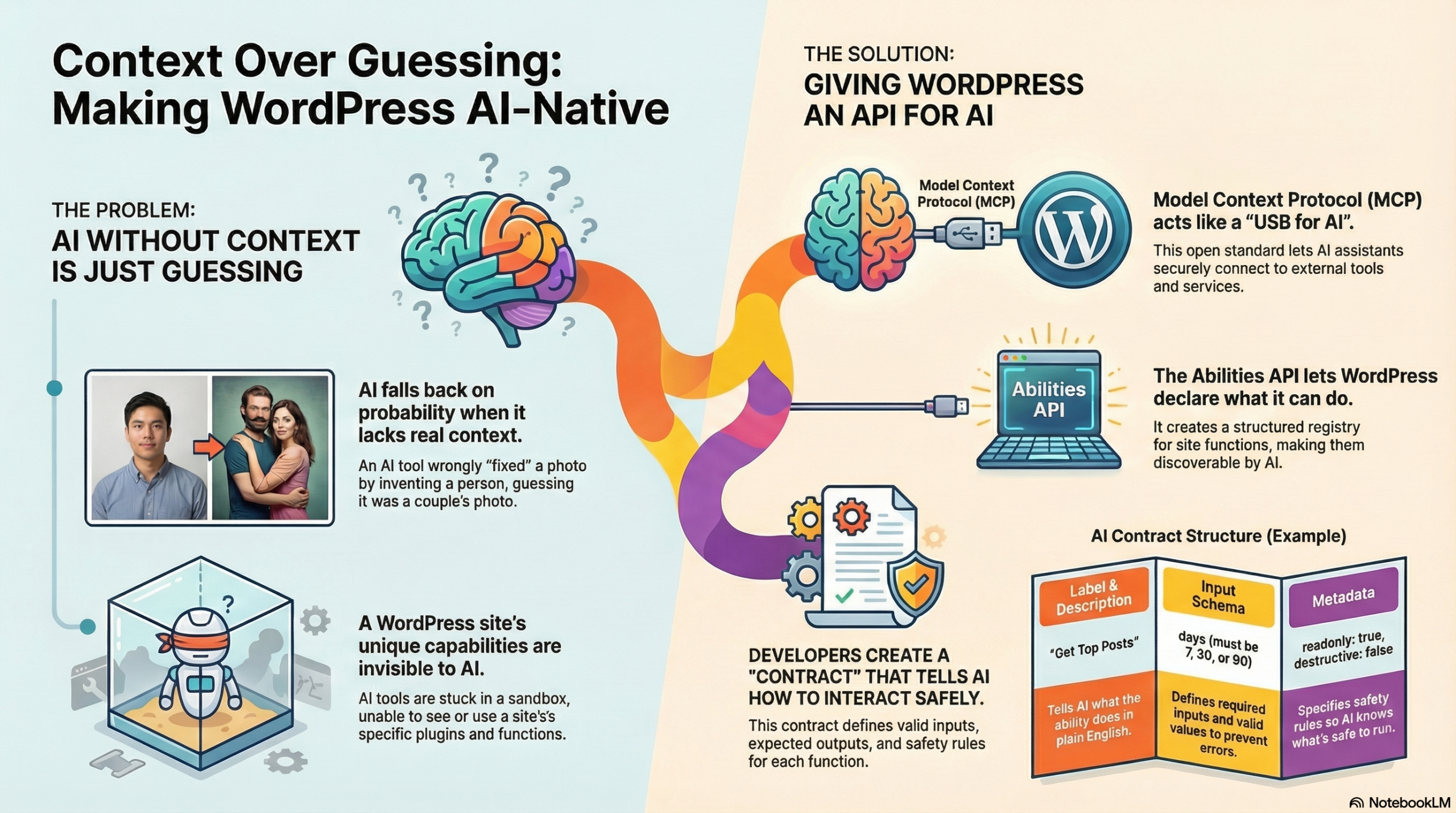
    You already know the story about AI replacing Aldo with a different man. The mojito floating in a jungle. The statistical probability boyfriend. That whole mess was my introduction to understanding why context matters so much in AI—it sees patterns and probabilities, not the specific thing you actually want.

    When I gave that talk at Web Directions Developer Summit last week, I kept coming back to this idea. AI without context gives you mystery replacement boyfriends. AI with context gives you what you actually asked for. And that difference? That’s what Model Context Protocol is trying to solve.

    I’ve written before about what MCP actually is and how it works—the servers and clients and tools and all that architecture. I’m not going to rehash those definitions here. What I want to talk about is what it looks like when WordPress becomes part of that ecosystem. When your site can actually tell AI what it can do instead of letting AI guess based on vibes.

    Because that’s what we’ve been building. And it’s available today.

    The thing that clicked for me – and I know I’ve been talking about this a lot lately, probably too much – is that we spent twenty-five years teaching browsers to understand us. From Geocities to CSS Grid, we learned their quirks, we fought with IE6, we eventually got them to do what we meant. Now we’re doing it again with AI, except this time the stakes feel different. Higher, maybe. Or just… weirder.

    WordPress 6.9 is introducing the Abilities API. It’s a structured way for plugins to declare what they can do—not just in code that developers read, but in a format that AI can discover and use. Think of it like… your plugin literally hands the AI a contract that says “here’s what I can do, here are my inputs, here are my outputs, here’s what I’m allowed to touch.”

    The WordPress MCP Adapter is what connects these two worlds. It’s a single Composer package that makes WordPress speak MCP. Your site becomes both an MCP server (AI can call your abilities) and an MCP client (WordPress can call other MCP servers). So WordPress isn’t just responding to HTTP requests anymore—it’s a participant in AI-driven workflows that can span multiple systems.

    I built a plugin to demonstrate this. Called it AI Content Strategist, which sounds more official than it probably deserves, but whatever. It does three things: shows top-performing posts over time, identifies underperforming content that needs help, and finds stale drafts gathering dust. Then it lets an AI generate actual content strategy based on real data from your site. Actual “your posts about X get 3x more views than posts about Y” kind of insights.

    Let me walk through how it works…

    First, you register a category. Not because it’s technically required, but because dumping all your abilities into one big junk drawer is a recipe for confusion. So you create mental models, content tools over here, admin tools over there, e-commerce stuff somewhere else. When AI explores your site, it sees logical groupings instead of chaos.

    wp_register_ability_category('content', [
        'label' => 'Content Management',
        'icon' => 'dashicons-edit'
    ]);
    

    Then you register the actual ability. It feels like registering a REST endpoint, which makes sense because conceptually it’s similar, you’re exposing functionality through an API. But now it has a documented contract that AI can discover and understand.

    wp_register_ability('content-strategist/get-top-posts', [
        'label' => 'Get Top Posts',
        'description' => 'Retrieve top performing posts by views',
        'category' => 'content',
        'execute_callback' => 'handle_get_top_posts',
        'permission_callback' => 'can_view_stats',
        // schemas and metadata go here
    ]);
    

    The schema is where you stop hallucination in its tracks. You define exactly what parameters the AI can pass, what types they are, what values are acceptable. The AI can’t guess that maybe “days” accepts strings or that limits can be negative. The contract lives right next to the code.

    'input_schema' => [
        'type' => 'object',
        'properties' => [
            'days' => [
                'type' => 'integer',
                'enum' => [7, 30, 90],
                'description' => 'Time period to analyse'
            ],
            'limit' => [
                'type' => 'integer',
                'minimum' => 1,
                'maximum' => 50
            ]
        ]
    ]
    

    Then there’s the metadata, which tells AI how to handle this ability safely. Is it read-only? Can it break things? Will running it twice with the same inputs give you the same result? This is huge for automation because the AI can look at these flags and decide what needs explicit user approval versus what’s safe to run automatically.

    'meta' => [
        'readonly' => true,
        'destructive' => false,
        'idempotent' => true
    ]
    

    To actually make your abilities available via MCP, you initialise the adapter. One line of code. That’s it. WordPress knows about your abilities, MCP knows about your abilities, AI can discover them and call them.

    if (class_exists('McpAdapter')) {
        McpAdapter::instance();
    }
    

    The execute callback is where your actual logic lives. When AI calls this ability, this function runs. It feels like normal WordPress development—you’re just writing PHP that fetches data and returns it. The only difference is that the consumer is an AI instead of a human clicking buttons in the admin.

    function handle_get_top_posts($input) {
        if (!is_jetpack_stats_available()) {
            return new WP_Error('stats_unavailable', 
                'Jetpack Stats must be connected');
        }
        
        $days = absint($input['days']);
        $limit = absint($input['limit']);
        
        $cache_key = "top_posts_{$days}_{$limit}";
        $cached = wp_cache_get($cache_key);
        if ($cached) return $cached;
        
        $stats = fetch_jetpack_stats($days, $limit);
        
        wp_cache_set($cache_key, $stats, '', HOUR_IN_SECONDS);
        return $stats;
    }
    

    I’m enriching the data too, which probably seems unnecessary but makes a huge difference for AI reasoning. Jetpack gives you raw numbers like views, IDs, that sort of thing. But if you add categories, publication dates, URLs, suddenly the AI can group posts, compare patterns, identify trends. You’re turning a stats dump into something strategy-ready.

    return [
        'post_id' => $post->ID,
        'title' => $post->post_title,
        'url' => get_permalink($post),
        'views' => $stats->views,
        'date_published' => mysql2date('c', $post->post_date_gmt),
        'categories' => wp_get_post_categories($post->ID, ['fields' => 'names'])
    ];
    

    Error handling matters more than you’d think. When things break—and they will—you want clear errors. Not “something went wrong” but “Jetpack Stats must be connected to retrieve analytics data.” For AI, this is the difference between hallucinating a solution and knowing exactly what’s broken.

    if (!$jetpack_connected) {
        return new WP_Error(
            'jetpack_not_connected',
            'Jetpack Stats must be connected to retrieve analytics data.'
        );
    }
    

    Real-world WordPress has edge cases. Like draft posts with invalid timestamps (0000-00-00 00:00:00 is a thing that exists). You have to handle them gracefully or everything breaks in weird ways.

    function get_safe_timestamp($post) {
        $gmt = $post->post_date_gmt;
        if ($gmt && $gmt !== '0000-00-00 00:00:00') {
            return mysql2date('c', $gmt);
        }
        return mysql2date('c', $post->post_date ?: current_time('mysql'));
    }
    

    When you add this to Claude Desktop (or any MCP-compatible AI) the AI goes from “let me guess what your site probably has” to “your site just told me exactly what it can do.”

    It can ask for your top 10 posts from the last 30 days and get accurate, real-time data. Then it can analyse that data, spot patterns, generate actual strategy and specific recommendations based on your actual content performance.

    I think we’re at the beginning of something that’s going to reshape how we think about WordPress plugins entirely. Abilities will become as common as REST endpoints. Voice-controlled admin will be normal. “Hey Claude, find all posts about topic X and create a content refresh plan” won’t sound futuristic. Cross-plugin workflows will emerge where WooCommerce talks to your membership plugin talks to your email system, all orchestrated by AI that understands all three.

    WordPress has survived every major platform shift by evolving early. Responsive design, REST API, Gutenberg. We’re shaping how WordPress participates in this ecosystem. And that feels important to get right.

    The edges are still sharp, I’ll be honest. Error handling needs work. Documentation needs improvement. Security models need refinement. Same energy as hunting for missing semicolons in JavaScript mouse trails, just with better error messages.

    But the foundation is solid. AI that understands your WordPress site isn’t future tech. It’s here. It’s open source. It’s available today. And it’s significantly better than mystery replacement boyfriends.

    I’ve put the full source code for the AI Content Strategist plugin on GitHub if you want to see how this actually works in practice. The WordPress MCP Adapter is the bridge that makes all of this possible. And there’s official documentation for the Abilities API coming in WordPress 6.9.

    If you’re building something with MCP and WordPress, I’d genuinely love to hear about it. We’re all figuring this out together, and right now it feels a lot like those early days of copying JavaScript snippets and praying they’d work. Except this time, the magic is teaching AI to understand context instead of teaching browsers to understand the cascade.


    This post is adapted from my talk at WordPress Engineers Conference. If you want to understand more about how MCP works under the hood, I wrote a glossary with metaphors that might help. And if you’re curious about bridging vibe coding to production, I’ve written about that too.


    Resource Links

    AI Content Strategist Plugin
    https://github.com/annacmc/ai-content-strategist
    Full source code for the example plugin from this post.

    Code Snippets
    https://gist.github.com/annacmc
    Individual code examples from the talk.

    Presentation Slides
    [Link coming soon]

    WordPress Abilities API Introduction
    https://developer.wordpress.org/news/2025/11/introducing-the-wordpress-abilities-api
    Official introduction to the Abilities API.

    WordPress Abilities API Repository
    https://github.com/WordPress/abilities-api
    Source code and documentation for the Abilities API.

    WordPress MCP Adapter
    https://make.wordpress.org/ai/2025/07/17/mcp-adapter/
    Official post about the MCP adapter for WordPress.

    WordPress MCP Adapter Repository
    https://github.com/WordPress/mcp-adapter
    The bridge that makes WordPress speak MCP. One Composer package.

    WP-ENV
    https://developer.wordpress.org/block-editor/getting-started/devenv/get-started-with-wp-env/
    Local WordPress development environment tool.

    Model Context Protocol
    https://modelcontextprotocol.io/
    Anthropic’s open standard for connecting AI to applications.

    MCP Inspector
    https://modelcontextprotocol.io/docs/tools/inspector
    Tool for testing and debugging your MCP servers.

    Claude Desktop
    https://claude.ai/download
    Desktop app with native MCP support for macOS and Windows.
  • A mostly-metaphoric MCP glossary

    A mostly-metaphoric MCP glossary

    When I first started learning about Model Context Protocol, I kept finding that there was no “intermediate” level. Every explanation assumed either I knew nothing, and that I should just like to know “What does MCP stand for?” or that I was an expert and already knew what everything meant. I’d read “the MCP server exposes tools that the client can invoke” and think… right, but what is a server in this context? Is it like a web server? And what makes something a “tool” versus a “resource”?

    I found myself toggling between documentation, blog posts, and example code, trying to piece together a mental model that made sense. Eventually I realised I needed to write down some explanations to help get everything to click.

    If you read my previous post about AI building terms and metaphors, you’ll know I’m a big believer in using multiple explanations to understand new concepts. Sometimes the technical metaphor lands, sometimes it’s the completely unrelated one that makes everything suddenly make sense.


    1. MCP SERVER

    TL;DR A programme that exposes tools, resources, or prompts that Claude (or other LLM clients) can use. The “backend” in the MCP architecture.

    What’s Important

    • Can be written in any language (Python, TypeScript most common)
    • Runs locally or remotely
    • Can expose multiple capabilities (tools + resources + prompts)
    • Discovered and connected to by MCP clients
    • Each server has a specific domain (filesystem, calendar, Linear, etc.)

    Unrelated Metaphor – Kitchen Stations

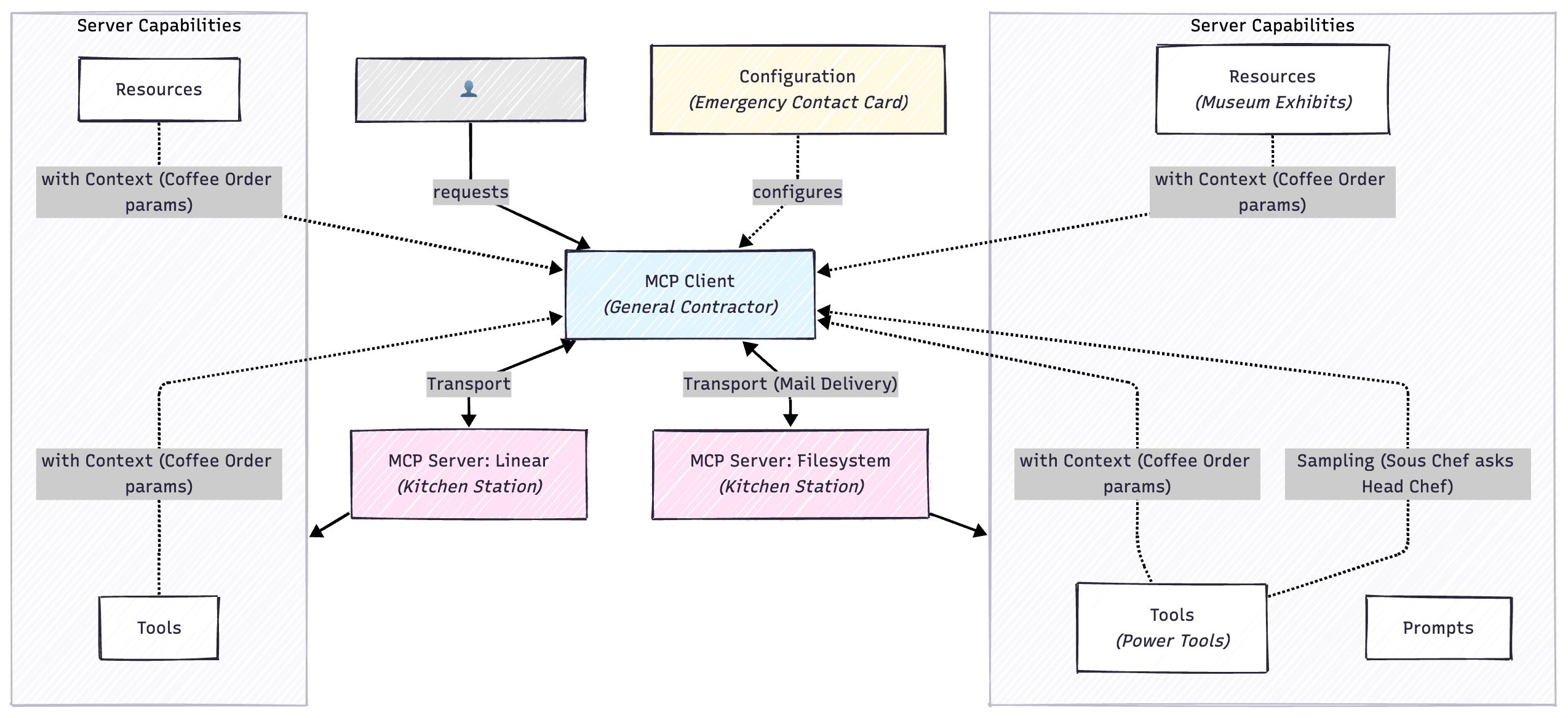
    You’re running a restaurant kitchen. Claude is the head chef who takes orders and coordinates everything. Each MCP server is a specialised station: the grill station (can cook meat), the salad station (can prep vegetables), the dessert station (can make sweets). When an order comes in, the head chef doesn’t cook everything. They delegate tasks to each station. “Grill station, I need a steak medium-rare!” The head chef knows what each station can do and coordinates them, but each station has its own tools and expertise.

    Developer Metaphor

    It’s like a microservice with a standardised API contract. Instead of building custom REST endpoints, you implement the MCP protocol (JSON-RPC 2.0 over stdio/HTTP). Your server registers “handlers” for different functions. Same concept as Express routes or RPC methods. The MCP client discovers your server’s capabilities at runtime (like OpenAPI/Swagger but for AI tools), then invokes your functions with typed parameters. Each server is a bounded context in DDD terms. Filesystem handles files, Linear handles issues, etc.


    2. MCP CLIENT

    TLDR;

    The application that connects to MCP servers and uses their capabilities. Claude.ai, Claude Desktop, and IDEs can be MCP clients.

    What’s Important

    • Manages connections to multiple servers
    • Handles authentication and permissions
    • Presents available tools to the LLM
    • Routes requests between LLM and servers
    • One client can connect to many servers

    Metaphor – General Contractor

    You’re renovating your house. The MCP client is your general contractor. You tell the contractor “I want a new kitchen with modern appliances.” The contractor maintains relationships with electricians (one server), plumbers (another server), cabinet makers (another server). When you make a request, the contractor figures out which specialists to call, coordinates their work, handles payments (authentication), and reports back to you. You don’t directly manage each specialist. The contractor does that.

    Developer Metaphor

    It’s like an API gateway combined with an orchestration layer. The client maintains a registry of connected services (servers), handles service discovery, manages authentication/authorisation for each service, and routes requests. When the LLM needs to call a function, the client: (1) determines which server handles it, (2) validates parameters against JSON Schema, (3) sends the request over the appropriate transport, (4) handles errors/retries, (5) returns results to LLM. It’s the conductor for a distributed system where the LLM is the orchestrator and servers are workers.


    3. TOOL (or FUNCTION)

    TLDR;

    An action the MCP server can perform. Functions Claude can call to do things in the external world.

    What’s Important

    • Defined with JSON Schema (parameters, types, descriptions)
    • Can modify external state (create files, send emails, etc.)
    • Returns results back to Claude
    • Can fail and return errors
    • Each tool has a clear purpose and parameters

    Unrelated Metaphor – Power Tools

    Imagine a carpenter’s workshop. Each MCP server is a workbench with specific power tools. The woodworking bench has: table saw (tool for cutting straight lines), router (tool for decorative edges), sander (tool for smoothing). When you need something built, the carpenter doesn’t just “work on wood”. They choose specific tools for specific tasks. “I need to cut this board” leads to using the table saw tool with parameters: length=24 inches, angle=45 degrees. Each tool does one thing well, takes specific inputs, and produces specific outputs.

    Developer Metaphor

    It’s exactly like function definitions with strict typing. Each tool is a function with a JSON Schema signature:

    typescript
    interface CreateFileTool {
      name: "create_file";
      parameters: {
        path: string;
        content: string;
      };
      returns: { success: boolean; error?: string };
    }

    The client validates parameters against the schema before invoking. The server executes the function and returns a typed result. It’s RPC with schema validation, like gRPC or tRPC, but designed for LLM consumption. The LLM sees these as “callable functions” and generates structured calls based on the schema.


    4. RESOURCE

    TLDR;

    Data that can be read from an MCP server. Like files, database records, or any content that can be retrieved.

    What’s Important

    • Read-only access to data
    • Identified by URI (like file:///path/to/file)
    • Can be text, images, or other media
    • Separate from tools (resources are passive data, tools are active functions)
    • Can be large (PDFs, images, long documents)

    Unrelated Metaphor – Museum Exhibits

    An MCP server is like a museum. Resources are the exhibits you can view: paintings, sculptures, artefacts. Each has a label (URI) like “Ancient Egypt Wing, Case 3, Artefact 42.” You can view any exhibit (read the resource), but you can’t modify them. They’re behind glass. Tools would be like the gift shop or café, places where you can do things (buy souvenirs, order food). Resources are static content you consume; tools are interactive actions you perform.

    Developer Metaphor

    Resources are like a read-only REST API or a file system mount. Each resource has a URI: resource://server-name/path/to/resource. You GET the resource (no POST/PUT/DELETE). The server implements handlers like:

    typescript

    async getResource(uri: string): Promise<{
      content: string | Uint8Array;
      mimeType: string;
    }>

    Think of it as a content delivery network where everything is immutable. The LLM can request resources to include in context, but resources don’t have side effects. It’s the separation between queries (resources) and commands (tools) in CQRS pattern.


    5. TRANSPORT

    TLDR;

    The communication layer between client and server. How messages are sent back and forth.

    What’s Important

    • stdio: Standard input/output (most common for local servers)
    • HTTP/SSE: For remote servers over network
    • Handles JSON-RPC 2.0 protocol messages
    • You usually don’t think about this directly
    • Abstracted away by MCP SDKs

    Unrelated Metaphor – Mail Delivery

    You write a letter to your friend (the message/request). Transport is how it gets delivered: you could hand-deliver it (stdio, fast, local only), use postal mail (HTTP, slower, works anywhere), or use a courier service (SSE, reliable, real-time updates). The content of your letter doesn’t change based on delivery method, only how it travels. Most people don’t care if their email uses SMTP or their texts use SMS. They just want messages delivered. Similarly, developers usually don’t think about MCP transport; the SDK handles it.

    Developer Metaphor

    It’s the OSI transport layer for MCP. stdio is like Unix pipes or IPC: low-latency, local process communication using stdin/stdout. HTTP/SSE is like REST over network: higher latency but works remotely. Both carry JSON-RPC 2.0 payloads (the application layer). Similar to how gRPC can use different transports (HTTP/2, Unix sockets), MCP can use stdio or HTTP. The SDK provides abstractions:

    typescript

    const transport = isLocal 
      ? new StdioTransport(command, args)
      : new HttpTransport(url);

    You rarely implement transport yourself. It’s provided infrastructure.


    6. CAPABILITY

    TLDR - Need to Know

    Feature flags indicating what an MCP server supports. Not all servers support all features.

    What’s Important

    • Tools capability: can provide callable functions
    • Resources capability: can provide readable data
    • Prompts capability: can provide prompt templates
    • Sampling capability: can request LLM completions (advanced)
    • Negotiated during connection handshake

    Unrelated Metaphor – Restaurant Menu Sections

    When you sit down at a restaurant, the menu shows capabilities: [Appetisers] [Entrees] [Desserts] [Bar]. Not every restaurant has every section. A breakfast diner might not have [Bar], a café might not have [Desserts]. Before ordering, you check what sections exist. You don’t ask a breakfast diner for cocktails because they don’t have that capability. Similarly, you don’t ask a read-only documentation server to create files (no tools capability). You only request documents (resources capability). The menu tells you what’s possible before you order.

    Developer Metaphor

    It’s like feature flags or interface implementation checking. During the initialisation handshake, server advertises capabilities:

    typescript

    interface ServerCapabilities {
      tools?: { listChanged?: boolean };
      resources?: { subscribe?: boolean; listChanged?: boolean };
      prompts?: { listChanged?: boolean };
      sampling?: {};
    }

    The client checks if (server.capabilities.tools) before trying to call tools. Similar to capability negotiation in HTTP (Accept headers) or feature detection in browsers (if ('geolocation' in navigator)). Prevents “method not supported” errors by advertising capabilities upfront. It’s the Interface Segregation Principle: servers only implement what they need.


    7. SAMPLING

    TLDR - Need to Know

    When an MCP server can request LLM completions from the client. Lets servers use AI to process data.

    What’s Important

    • Advanced feature (most servers don’t use this)
    • Server can ask client “hey, can you have Claude analyse this?”
    • Enables AI-powered tools that need LLM reasoning
    • Requires explicit permission from user
    • Server sends prompt, client returns LLM response

    Unrelated Metaphor – Sous Chef Asking Head Chef

    Normally the head chef (Claude) tells the sous chefs (servers) what to cook. But sometimes a sous chef needs culinary expertise: “Chef, I found this mystery ingredient. What is it and how should I use it?” The sous chef asks the head chef for their expert opinion, then uses that advice to complete their work. Sampling is when a specialist (server) consults the expert (LLM) for analysis before continuing their task. Most specialists don’t need this. The grill station knows how to cook steak. But occasionally, complex situations require the head chef’s input.

    Developer Metaphor

    It’s like a worker service calling back to the orchestrator for AI assistance. Normally: Client to Server (tool invocation). With sampling: Server to Client to LLM to Client to Server (callback pattern). The server makes a “give me a completion” request:

    typescript

    const analysis = await client.sampling.createMessage({
      messages: [{ role: "user", content: "Analyse this code..." }],
      maxTokens: 1000
    });

    It’s like a microservice making an RPC call back to a central AI service. Useful for servers that need AI reasoning (e.g., code analysis, content understanding) but don’t want to run their own LLM. The client controls costs/permissions. Servers request, clients approve.


    8. CONTEXT (or Arguments/Parameters)

    TLDR – Need to Know

    Data passed when calling tools or accessing resources. The inputs to MCP functions.

    What’s Important

    • Defined by JSON Schema for each tool
    • Type validation enforced
    • Can be simple (strings, numbers) or complex (nested objects)
    • Tool execution fails if context doesn’t match schema
    • Each tool specifies required vs optional parameters

    Unrelated Metaphor – Coffee Order

    When you order coffee, you provide context/parameters: drink type (required: “latte”), size (required: “grande”), milk (optional: “oat milk”), extras (optional: “extra shot”). The barista can’t make your drink without the required parameters. If you just say “coffee please,” they ask questions to get the missing context. Some parameters have defaults (regular milk if you don’t specify). Context is all the specific details needed to fulfil your request. The menu shows what parameters each drink needs: some required, some optional, some with defaults.

    Developer Metaphor

    It’s literally function parameters with JSON Schema validation:

    typescript

    type CreateFileParams = {
      path: string;           // required
      content: string;        // required
      encoding?: string;      // optional, default: 'utf-8'
    };

    Before the server function executes, the client validates params against schema (like TypeScript compile-time checking or Joi runtime validation). Similar to gRPC message definitions or OpenAPI parameter specs. The schema defines:

    • Parameter names and types
    • Which are required vs optional
    • Defaults and constraints
    • Descriptions for LLM understanding

    The LLM generates structured calls matching these schemas.


    9. CONFIGURATION

    TLDR – Need to Know

    Settings that tell the MCP client which servers to connect to and how to authenticate.

    What’s Important

    • Usually in claude_desktop_config.json or similar
    • Specifies server command to run or URL to connect to
    • Can include environment variables (API keys, etc.)
    • Per-server settings (allowed directories, permissions)
    • Client reads this on startup to initialise servers

    Unrelated Metaphor – Emergency Contact Card

    You have a card in your wallet with emergency contacts: Mum (call: 555-1234), Doctor (call: 555-5678, insurance ID: XYZ123), Lawyer (email: lawyer@firm.com, case number: 456). This card tells you who to contact for what situation and what information they need. MCP configuration is the same. It’s your assistant’s contact card for all the specialists. It lists: who they are, how to reach them, what credentials to use, and what they’re allowed to do. Update the card when contacts change. Your assistant can’t work without this card. They don’t know who to call.

    Developer Metaphor

    It’s like a docker-compose.yml or serverless.yml: infrastructure-as-code for MCP services:

    json

    {
      "mcpServers": {
        "filesystem": {
          "command": "npx",
          "args": ["-y", "@modelcontextprotocol/server-filesystem", "/allowed/path"],
          "env": { "DEBUG": "mcp:*" }
        },
        "linear": {
          "command": "npx",
          "args": ["-y", "@linear/mcp-server"],
          "env": { "LINEAR_API_KEY": "${LINEAR_API_KEY}" }
        }
      }
    }

    The client reads this on startup, spawns processes (stdio) or connects to URLs (HTTP), passes env vars, handles authentication. It’s service configuration, similar to Kubernetes manifests or systemd unit files. Declarative specification of what services to run and how.


    Where to Go From Here

    I’m currently building custom MCP servers for some of my own projects, and I expect my understanding will continue evolving. If you spot something I’ve explained unclearly (or got wrong), I’d genuinely love to hear about it. This is a living document that I’ll update as I learn more.

    FAQ

    What’s the difference between an MCP server and an MCP client?

    The server exposes capabilities — tools, resources, prompts — that an AI can use. The client (like Claude Desktop) connects to those servers, handles auth, and shuttles messages between the AI and the right server. One client can happily talk to lots of servers at once.

    Do I need to know Python or TypeScript to use MCP?

    Not to use it. You can point Claude Desktop at existing servers with a config file and never touch code. If you want to build your own server, TypeScript and Python have the most mature SDKs right now, but the protocol itself doesn't care what language you use.

    What’s the simplest way to get started with MCP?

    Connect Claude Desktop to the Filesystem MCP server. Point it at a project folder, then ask Claude to analyse the code, docs, or notes inside. You'll immediately feel the difference between the model guessing and the model actually knowing what's in your files.

    Is MCP only for developers?

    Right now it's mostly developer-shaped. Setting up servers still means editing config files and being comfortable in a terminal. But as more tools ship MCP support out of the box, you'll be able to benefit from it without having to fiddle with all the plumbing yourself.

    The best way to really understand MCP is to build something with it. Start small. Maybe connect Claude Desktop to an existing server like the Filesystem or Linear servers. Play around with what they can do. Then try building a simple read-only server that exposes some data you care about. The concepts that feel abstract now will suddenly click into place once you’re working with actual code.

    And if you’re building something interesting with MCP, I’d love to hear about it. We’re all figuring this out together.

  • From Geocities to GPT

    From Geocities to GPT

    I’ve been trying to find my first website for ages now. The McPhee Family Pets, circa 1999.

    Hours down rabbit holes of the Wayback Machine, trying every possible URL combination I can think of. Was it heartland/prairie? EnchantedForest? Did I use underscores or hyphens? The internet has swallowed it whole, along with Porygon’s Cave and whatever I called Horsea’s page (Horsea’s Haven? Horsea’s Hideout? The name floats just out of reach).

    There’s something devastating about losing these first creative digital expressions. Like they existed in some parallel internet that’s been paved over. I was ten years old with a chinchilla, pet rats, mice, chickens – the list was genuinely ridiculous – and I believed each one deserved their own dedicated webpage. Their own corner of the internet, pure “here is my rabbit named Libby and here are three facts about her” energy.

    I remember the old web though. Not all of it, but fragments. Like how our dial-up plan gave us an allowance for New Zealand hosted websites versus international ones, so I’d browse locally hosted tutorials for hours. There was one about frames that explained them like a dinner plate – your main content (meat) in the middle, navigation (salad) on the side, maybe a footer (dessert) down the bottom. I thought this was the most brilliant metaphor at the time. I probably spent weeks just moving frame borders around, watching content reflow, feeling like an architect.

    Then there was Vikimouse and the MousePad Kids – this website where you could adopt virtual mice that lived in elaborately crafted pixel houses. Someone called Vikimouse had made each one pixel by pixel. I’d stare at them, trying to understand how someone had that much patience. How they knew which pixel should be brown and which should be tan to make it look like wood grain. I’d view source on everything, trying to decode the magic. And then I would populate my home page with entire families of adopted, digital, pixel-art rodents.

    The platform wandering started early. Geocities, Tripod, Bravepages, Angelfire – I was chasing free. Zero dollar budget, minimal ads, maximum creative control. Each platform migration was like trying on a different digital identity. Would THIS be the place where my Pokemon fan sites would finally look professional? (They never did. But they had auto-playing MIDI files and that’s what really mattered.)

    I joined a forum called Young Coders, or something close to that. We’d share JavaScript snippets we’d found – mouse trails, falling snow, those eyes that followed your cursor around the page. Copy, paste, pray it worked. When it did, you felt like you’d just cast an actual spell. When it didn’t, you’d spend hours hunting for the missing semicolon, not knowing that twenty-five years later you’d still be hunting for missing semicolons, just now with better error messages.

    As I grew into a teenager, things got more sophisticated. Or at least, I thought they did. Dreamweaver felt like cheating after hand-coding everything. Macromedia Flash was pure magic – suddenly things could MOVE. Not just blink tags and marquees, but actual animation. I made band fan pages with the dedication of a digital shrine builder. Learned some ASP.NET because it sounded important and grown-up, and eventually grew into PHP, where I got my first taste of the pre-WordPress bbPress.

    The webrings were their own special kind of commitment. You’d apply to join one – “Anna’s Pokemon Paradise is applying to join the Elite Water Pokemon Webring” – and wait anxiously for approval. Then you’d get this chunk of HTML to add to your site with Previous and Next buttons, making you part of this infinite loop of similarly obsessed people. I was probably in twelve different rings at one point. Pokemon ones, virtual pet ones, one for just about anything.

    Guestbooks were mandatory. You weren’t a real website without a guestbook. Mine was from Bravenet, plastered with whatever background GIF I thought was sophisticated that week. The entries were always the same – “Cool site!” “Love the pics!” and occasionally someone would actually write something substantial and you’d feel like you’d made it. Like your website was a real place people visited, not just pixels you were shouting into the void.

    Then came the band fan pages. I had opinions and they needed dedicated web spaces. Frames for everything. Left frame: navigation with each band member’s name in a different font, Top frame: band logo I’d painstakingly cut out of a larger image in Paint Shop Pro. Main frame: “News” that I’d copied from other fan sites, maybe a gallery of images that took seventeen years to load on dial-up. I probably had a disclaimer somewhere about not owning the images, as if Sony Music was going to come after a fourteen-year-old in New Zealand.

    I remember the exact moment I discovered Google in beta. I was a catalogue of search engines and web directory listings before that (I don’t say catalogue metaphorically, I kid you not – I had a clearfile folder where I would write down the URL of every search engine and directory I could find) But Google was just… empty. A logo, a search box, two buttons. It felt wrong, like someone had forgotten to finish building it. Where were all the portal features? The weather? The news? But then you searched for something and it actually found what you wanted. Not seventeen pages of garbage with your result buried on page twelve. It was unsettling how good it was.

    CSS Zen Garden broke my brain entirely. This was maybe 2003? I’d been tables-for-layout loyal, defending my nested tables like they were a personal religion. Then someone showed me CSS Zen Garden – the exact same HTML, completely transformed just by changing the stylesheet. I spent hours viewing source, trying to understand how the garden became the ocean became the subway map. It was like finding out you’d been painting with your fingers while everyone else had brushes.

    I think I tried to recreate every single design. Failed spectacularly. But in that failure, I started to understand the cascade, specificity, the box model (though IE6 would torture us with that for years to come). Started to grasp that we were trying to teach browsers our intent. That HTML was supposed to be structure, CSS was presentation, and mixing them was… wrong somehow? Though I definitely kept using inline styles for “just this one quick thing” for an embarrassingly long time after.

    We spent the next two decades getting really good at this conversation with browsers. Teaching them to understand that when we said “display: flex” we meant “please for the love of god just center this div.” Learning their quirks – Safari would do this, Chrome would do that, and IE… well, IE would do whatever it felt like. We learned to speak their language, to think in their logic.

    And now here we are, trying to teach AI to understand context, and it’s like being ten years old staring at Vikimouse’s pixel art again. We know there’s something magical here, something transformative. But we’re still copy-pasting code snippets and praying they work. Still hunting for missing semicolons, just now they’re in JSON configs for MCP servers instead of JavaScript mouse trails.

    The thing is, AI doesn’t understand context the way we learned to understand the cascade.

    When I’m debugging why an MCP server won’t talk to my tools properly, it feels exactly like debugging why my frames wouldn’t resize in Netscape Navigator. Except now instead of teaching a browser that “frameborder=’0′” means “please don’t draw that ugly gray line,” I’m teaching Claude that when I say “search my previous conversations about MCP” I mean actual conversations, not some hallucinated memory of conversations that never happened.

    I’ve been experimenting with MCP servers for a little while now, and it’s giving me the same feeling as those early days of copying JavaScript snippets. You know something powerful is happening, but you’re not entirely sure why it works when it works. Just last week I spent three hours trying to figure out why my context wasn’t passing through properly, only to discover I had the wrong quotation marks. Not missing ones – the wrong kind. Curly quotes instead of straight ones. In 1999, it was forgetting to close a font tag. In 2025, it’s Unicode characters that look identical but aren’t.

    The documentation situation feels familiar too. Back then, you’d have seventeen browser tabs open (once we got tabs – remember when opening a new site meant opening a whole new window?), each with a different tutorial that explained things slightly differently. Now I have seventeen tabs of Anthropic docs, GitHub repos, and Discord conversations where someone’s figured out something that isn’t documented anywhere yet. We’re all still collectively teaching each other, just now it’s in Slack threads instead of Young Coders forums.

    But here’s what’s making me think: We got really good at teaching browsers to understand us. It took twenty-five years, but we did it. We went from table-based layouts and spacer GIFs to CSS Grid and container queries. From “best viewed in Internet Explorer 5” badges to responsive designs that work on everything from a watch to a wall-mounted TV (and perhaps even your fridge!)

    What I’m wondering is – what will teaching AI look like in twenty-five years? Right now, we’re in the Geocities era of AI interaction. We’re copy-pasting prompts like we used to copy-paste JavaScript snow effects. We’re joining the AI equivalent of webrings – Discord servers and GitHub repos where people share their successful MCP configurations. We’re building the 2025 equivalent of “The McPhee Family Pets” – earnest, ambitious projects that probably won’t exist in their current form in five years, let alone twenty-five.

    I found a screenshot the other day of a website I made in 2001. It had a splash page. Remember splash pages? “Click here to enter” with some elaborate Flash animation that everyone immediately clicked through. It seemed so important at the time – the grand entrance to your digital space. Now it’s almost embarrassing to look at. What will we think of our current AI interactions in 2049? Will we laugh at how we used to manually configure context windows? Will prompt engineering seem as quaint as table-based layouts?

    Sometimes I wonder if those lost websites – The McPhee Family Pets, Porygon’s Cave, Horsea’s whatever-it-was – are better off disappeared. They exist now exactly as they should: perfect in memory, terrible in reality. They were never about being good websites. They were about that feeling when your HTML finally worked, when your frame borders aligned, when someone actually signed your guestbook.

    That’s what I’m chasing now with MCP servers and AI tools. Not the perfect implementation, but that moment when something clicks into place. When the context passes through correctly and suddenly your tool can see your previous conversations. When the AI understands not just what you’re saying but what you mean. It’s the same magic, just with better error messages and worse documentation.

    We spent decades teaching browsers to understand our intent. Now we’re teaching AI. The difference is, this time I’m not ten years old with unlimited time and a chinchilla. I’m thirty-nine with a toddler, a full-time job, and approximately seventeen minutes of free time per day. But I still get that same feeling when something finally works. That same urge to view source on everything, to understand the magic.

    Don’t judge – we all started somewhere. And honestly? We’re all starting somewhere again.

    The web I grew up with is gone – not just my websites, but that whole version of the internet where teenagers could build shrines to their pets and their favourite bands without thinking about SEO, TikTok videos, engagement metrics or whether an AI could do it better. But maybe that’s okay. Maybe each generation gets their own version of the web to figure out, to break, to build weird things on.

    I just hope somewhere out there, some ten-year-old is building the AI equivalent of The McPhee Family Pets. Teaching GPT about their pet chickens. Making something wonderfully terrible that they’ll try to find in twenty-five years and fail.

    That’s the web I want to help build.

  • AI Replaced My Boyfriend: A Story About Context in Machine Learning

    AI Replaced My Boyfriend: A Story About Context in Machine Learning

    I was trying to get a professional headshot the other day. You know how it is. I needed something recent, and all my decent photos are either me in the garden covered in dirt or family shots with my daughter.

    There was this one photo from Mexico City I really liked. Good lighting, I actually looked awake, my hair was doing what it was supposed to. Only problem? Aldo had his arm around me. Not exactly the solo professional headshot I needed.

    Anna and her partner Aldo in Mexico City, the photo she wanted to turn into a professional headshot

    So I turned to Photoshop’s new AI features. Simple request, I thought. Remove the person next to me, give me a neutral professional background. What could go wrong?

    The AI looked at my photo, understood the assignment, and promptly… gave me a new boyfriend.

    Not a modified Aldo. Not an empty space where Aldo used to be. A completely different Hispanic-looking man, arm still around me, same intimate couple pose. The AI had racially profiled my actual partner just enough to select an appropriate replacement from its training data. Like it was saying, “Based on the statistical probability of who this woman would have her arm around, let me provide you with Hispanic Male, Option B.”

    I laughed until I nearly cried. Then I tried again.

    Second attempt? The AI removed Aldo successfully this time, but decided I needed a jungle background and put a cocktail in my hand. Because nothing says “professional headshot” like sipping a mojito in the rainforest, apparently.

    This whole experience reminded me of another trend that swept through LinkedIn a while back: asking ChatGPT to create an image of you based on what it knows from your conversations. I tried it, curious what patterns the AI had picked up about me.

    First result: I was a white man with a beard, slight smile. The classic “software developer” stereotype from every stock photo ever taken.

    I tried again a few weeks later, after they’d clearly done some diversity training on their models. This time? I was a Black woman with natural hair and glasses, standing on a generic city street.

    The overcorrection was almost funnier than the original bias. Like watching someone try so hard not to be racist that they circle back around to being weird about race in a completely different way.

    Here’s what fascinates me about all this: these systems are doing exactly what they’re trained to do. When my arm was positioned like it was around someone, the AI couldn’t comprehend that I wanted that someone to not exist. Its training data says arms in that position belong around people. So it provided a person.

    When asked to imagine what a software developer named Anna looks like, it ping-ponged between “definitely a white man” and “we’ve been told to increase diversity, so definitely not a white man”, never quite landing on anything close, despite a lengthy chat and project history which knows so much about me.

    The problem isn’t that these models are broken. They’re pattern-matching perfectly against their training data. The problem is they have no context for what we actually want or who we actually are. They’re making statistical guesses based on millions of images and conversations that may or may not represent reality, and definitely don’t represent individual reality.

    This is exactly why I’ve been obsessed with Model Context Protocol (MCP) lately. It’s attempting to solve this exact problem: how do we give AI systems the context they need to understand not just the statistical average, but the specific situation? How do we move from “woman with Hispanic partner probably wants another Hispanic man in photo” to “this particular person wants this particular other person removed from this particular photo”?

    Context isn’t just about providing more information. It’s about providing the right information at the right time. It’s the difference between an AI that replaces your boyfriend with a statistical probability and one that understands what you’re actually trying to achieve.

    Third time was the charm, by the way. Finally got that professional headshot with a normal background. No replacement boyfriends, no tropical cocktails. Just me, looking professionally adequate, ready for my speaker bio.

    Though I’m keeping the jungle cocktail version. You never know when you’ll need a professional photo that says “I debug JavaScript from the rainforest.”


    I’ll be diving deeper into MCP and how context shapes AI behavior at Web Directions Developer Summit in Sydney this November. If you’re curious about the technical side of why AI keeps making these hilarious (and sometimes concerning) assumptions, come find me there.

    ps. what do you think of my headshot now?


    Anna McPhee speaker banner for Web Directions Developer Summit

    FAQ

    Why did AI give me a different boyfriend instead of removing him?

    AI image models are trained on statistical patterns, not intent. When your arm position matched “couple pose” in training data, the model filled the gap with the most statistically likely person — rather than understanding you wanted an empty space.

    What is Model Context Protocol (MCP) and why does it help?

    MCP is an open standard that lets AI systems receive structured context about a specific situation, rather than guessing from statistical averages. It’s the difference between AI that replaces your partner with “Hispanic Male, Option B” and AI that understands exactly what you’re trying to achieve.

    Does AI have racial bias in image generation?

    Yes — current models reflect biases in their training data. The pattern of replacing Aldo with a “statistically probable” partner, and generating a white male developer as a default, are both examples of bias baked into training data rather than intentional design.