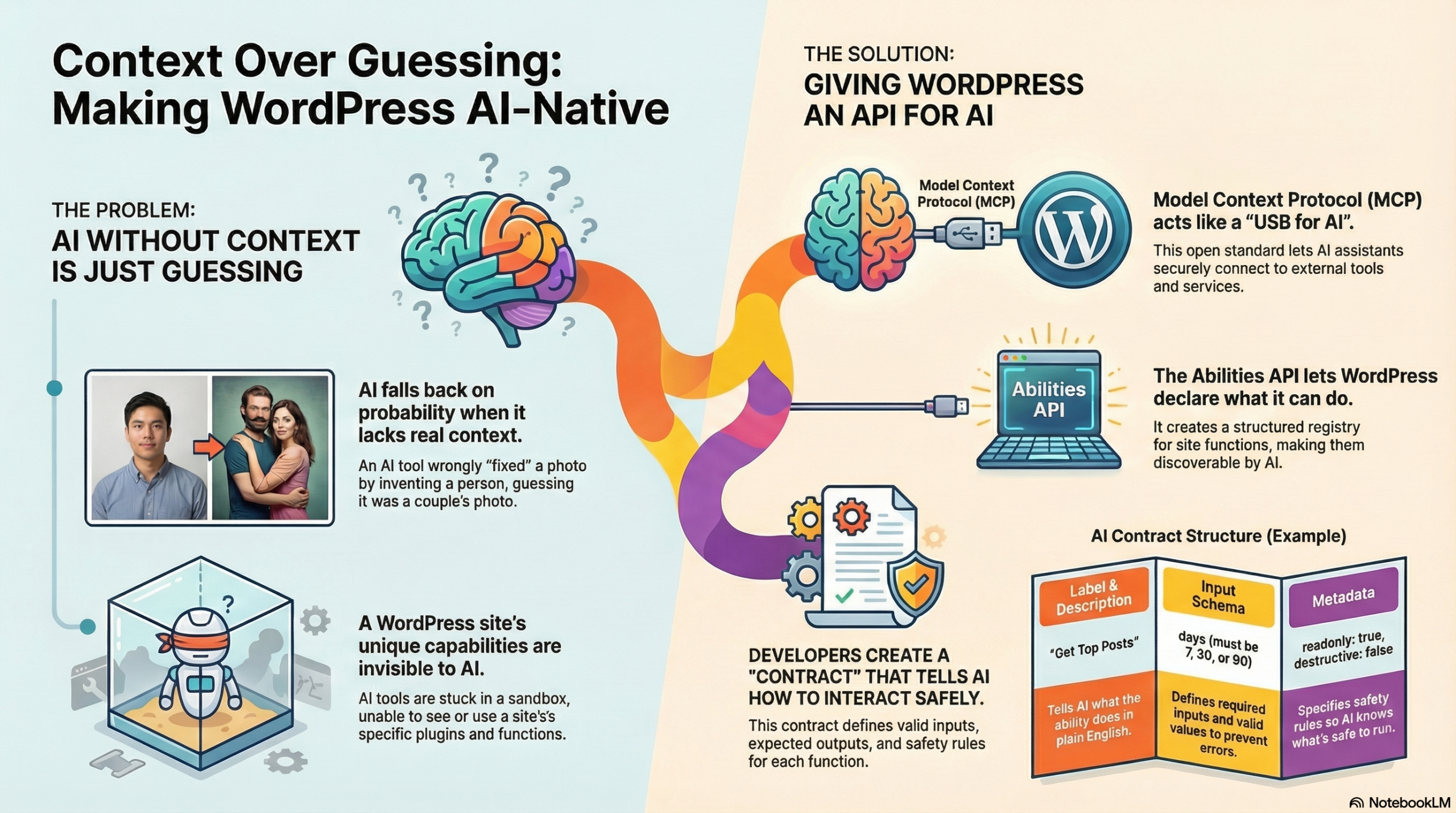
You already know the story about AI replacing Aldo with a different man. The mojito floating in a jungle. The statistical probability boyfriend. That whole mess was my introduction to understanding why context matters so much in AI—it sees patterns and probabilities, not the specific thing you actually want.
When I gave that talk at Web Directions Developer Summit last week, I kept coming back to this idea. AI without context gives you mystery replacement boyfriends. AI with context gives you what you actually asked for. And that difference? That’s what Model Context Protocol is trying to solve.
I’ve written before about what MCP actually is and how it works—the servers and clients and tools and all that architecture. I’m not going to rehash those definitions here. What I want to talk about is what it looks like when WordPress becomes part of that ecosystem. When your site can actually tell AI what it can do instead of letting AI guess based on vibes.
Because that’s what we’ve been building. And it’s available today.
The thing that clicked for me – and I know I’ve been talking about this a lot lately, probably too much – is that we spent twenty-five years teaching browsers to understand us. From Geocities to CSS Grid, we learned their quirks, we fought with IE6, we eventually got them to do what we meant. Now we’re doing it again with AI, except this time the stakes feel different. Higher, maybe. Or just… weirder.
WordPress 6.9 is introducing the Abilities API. It’s a structured way for plugins to declare what they can do—not just in code that developers read, but in a format that AI can discover and use. Think of it like… your plugin literally hands the AI a contract that says “here’s what I can do, here are my inputs, here are my outputs, here’s what I’m allowed to touch.”
The WordPress MCP Adapter is what connects these two worlds. It’s a single Composer package that makes WordPress speak MCP. Your site becomes both an MCP server (AI can call your abilities) and an MCP client (WordPress can call other MCP servers). So WordPress isn’t just responding to HTTP requests anymore—it’s a participant in AI-driven workflows that can span multiple systems.
I built a plugin to demonstrate this. Called it AI Content Strategist, which sounds more official than it probably deserves, but whatever. It does three things: shows top-performing posts over time, identifies underperforming content that needs help, and finds stale drafts gathering dust. Then it lets an AI generate actual content strategy based on real data from your site. Actual “your posts about X get 3x more views than posts about Y” kind of insights.
Let me walk through how it works…
First, you register a category. Not because it’s technically required, but because dumping all your abilities into one big junk drawer is a recipe for confusion. So you create mental models, content tools over here, admin tools over there, e-commerce stuff somewhere else. When AI explores your site, it sees logical groupings instead of chaos.
wp_register_ability_category('content', [
    'label' => 'Content Management',
    'icon' => 'dashicons-edit'
]);
Then you register the actual ability. It feels like registering a REST endpoint, which makes sense because conceptually it’s similar, you’re exposing functionality through an API. But now it has a documented contract that AI can discover and understand.
wp_register_ability('content-strategist/get-top-posts', [
    'label' => 'Get Top Posts',
    'description' => 'Retrieve top performing posts by views',
    'category' => 'content',
    'execute_callback' => 'handle_get_top_posts',
    'permission_callback' => 'can_view_stats',
    // schemas and metadata go here
]);
The schema is where you stop hallucination in its tracks. You define exactly what parameters the AI can pass, what types they are, what values are acceptable. The AI can’t guess that maybe “days” accepts strings or that limits can be negative. The contract lives right next to the code.
'input_schema' => [
    'type' => 'object',
    'properties' => [
        'days' => [
            'type' => 'integer',
            'enum' => [7, 30, 90],
            'description' => 'Time period to analyse'
        ],
        'limit' => [
            'type' => 'integer',
            'minimum' => 1,
            'maximum' => 50
        ]
    ]
]
Then there’s the metadata, which tells AI how to handle this ability safely. Is it read-only? Can it break things? Will running it twice with the same inputs give you the same result? This is huge for automation because the AI can look at these flags and decide what needs explicit user approval versus what’s safe to run automatically.
'meta' => [
    'readonly' => true,
    'destructive' => false,
    'idempotent' => true
]
To actually make your abilities available via MCP, you initialise the adapter. One line of code. That’s it. WordPress knows about your abilities, MCP knows about your abilities, AI can discover them and call them.
if (class_exists('McpAdapter')) {
    McpAdapter::instance();
}
The execute callback is where your actual logic lives. When AI calls this ability, this function runs. It feels like normal WordPress development—you’re just writing PHP that fetches data and returns it. The only difference is that the consumer is an AI instead of a human clicking buttons in the admin.
function handle_get_top_posts($input) {
    if (!is_jetpack_stats_available()) {
        return new WP_Error('stats_unavailable',
            'Jetpack Stats must be connected');
    }

    $days = absint($input['days']);
    $limit = absint($input['limit']);

    $cache_key = "top_posts_{$days}_{$limit}";
    $cached = wp_cache_get($cache_key);
    if ($cached) return $cached;

    $stats = fetch_jetpack_stats($days, $limit);

    wp_cache_set($cache_key, $stats, '', HOUR_IN_SECONDS);
    return $stats;
}
I’m enriching the data too, which probably seems unnecessary but makes a huge difference for AI reasoning. Jetpack gives you raw numbers like views, IDs, that sort of thing. But if you add categories, publication dates, URLs, suddenly the AI can group posts, compare patterns, identify trends. You’re turning a stats dump into something strategy-ready.
return [
    'post_id' => $post->ID,
    'title' => $post->post_title,
    'url' => get_permalink($post),
    'views' => $stats->views,
    'date_published' => mysql2date('c', $post->post_date_gmt),
    'categories' => wp_get_post_categories($post->ID, ['fields' => 'names'])
];
Error handling matters more than you’d think. When things break—and they will—you want clear errors. Not “something went wrong” but “Jetpack Stats must be connected to retrieve analytics data.” For AI, this is the difference between hallucinating a solution and knowing exactly what’s broken.
if (!$jetpack_connected) {
    return new WP_Error(
        'jetpack_not_connected',
        'Jetpack Stats must be connected to retrieve analytics data.'
    );
}
Real-world WordPress has edge cases. Like draft posts with invalid timestamps (0000-00-00 00:00:00 is a thing that exists). You have to handle them gracefully or everything breaks in weird ways.
function get_safe_timestamp($post) {
    $gmt = $post->post_date_gmt;
    if ($gmt && $gmt !== '0000-00-00 00:00:00') {
        return mysql2date('c', $gmt);
    }
    return mysql2date('c', $post->post_date ?: current_time('mysql'));
}
When you add this to Claude Desktop (or any MCP-compatible AI) the AI goes from “let me guess what your site probably has” to “your site just told me exactly what it can do.”
It can ask for your top 10 posts from the last 30 days and get accurate, real-time data. Then it can analyse that data, spot patterns, generate actual strategy and specific recommendations based on your actual content performance.
I think we’re at the beginning of something that’s going to reshape how we think about WordPress plugins entirely. Abilities will become as common as REST endpoints. Voice-controlled admin will be normal. “Hey Claude, find all posts about topic X and create a content refresh plan” won’t sound futuristic. Cross-plugin workflows will emerge where WooCommerce talks to your membership plugin talks to your email system, all orchestrated by AI that understands all three.
WordPress has survived every major platform shift by evolving early. Responsive design, REST API, Gutenberg. We’re shaping how WordPress participates in this ecosystem. And that feels important to get right.
The edges are still sharp, I’ll be honest. Error handling needs work. Documentation needs improvement. Security models need refinement. Same energy as hunting for missing semicolons in JavaScript mouse trails, just with better error messages.
But the foundation is solid. AI that understands your WordPress site isn’t future tech. It’s here. It’s open source. It’s available today. And it’s significantly better than mystery replacement boyfriends.
I’ve put the full source code for the AI Content Strategist plugin on GitHub if you want to see how this actually works in practice. The WordPress MCP Adapter is the bridge that makes all of this possible. And there’s official documentation for the Abilities API coming in WordPress 6.9.
If you’re building something with MCP and WordPress, I’d genuinely love to hear about it. We’re all figuring this out together, and right now it feels a lot like those early days of copying JavaScript snippets and praying they’d work. Except this time, the magic is teaching AI to understand context instead of teaching browsers to understand the cascade.
This post is adapted from my talk at WordPress Engineers Conference. If you want to understand more about how MCP works under the hood, I wrote a glossary with metaphors that might help. And if you’re curious about bridging vibe coding to production, I’ve written about that too.
Resource Links
AI Content Strategist Plugin
https://github.com/annacmc/ai-content-strategist
Full source code for the example plugin from this post.
Code Snippets
https://gist.github.com/annacmc
Individual code examples from the talk.
Presentation Slides
[Link coming soon]
WordPress Abilities API Introduction
https://developer.wordpress.org/news/2025/11/introducing-the-wordpress-abilities-api
Official introduction to the Abilities API.
WordPress Abilities API Repository
https://github.com/WordPress/abilities-api
Source code and documentation for the Abilities API.
WordPress MCP Adapter
https://make.wordpress.org/ai/2025/07/17/mcp-adapter/
Official post about the MCP adapter for WordPress.
WordPress MCP Adapter Repository
https://github.com/WordPress/mcp-adapter
The bridge that makes WordPress speak MCP. One Composer package.
WP-ENV
https://developer.wordpress.org/block-editor/getting-started/devenv/get-started-with-wp-env/
Local WordPress development environment tool.
Model Context Protocol
https://modelcontextprotocol.io/
Anthropic’s open standard for connecting AI to applications.
MCP Inspector
https://modelcontextprotocol.io/docs/tools/inspector
Tool for testing and debugging your MCP servers.
Claude Desktop
https://claude.ai/download
Desktop app with native MCP support for macOS and Windows.


